AI photo generator of yourself
Upload one selfie, describe a new scene, outfit or style, and get a picture that still looks like you. You can try it free; sign up with an email code.
Production preview
One selfie, four AI models: which one still looks like you?
We uploaded the same selfie to four models, asked for three new scenes, and kept the first picture each made. Every prompt asked the model to keep her face, hair, freckles and nose stud the same, and the small silver nose stud turned out to be the easiest way to tell who really kept the face. GPT Image 2.5 Flare and Seedream 5.0 Flash kept the face, freckles and stud in every scene: Flare gave her new poses and took one to two minutes, Seedream mostly kept the selfie's pose and took about 15 seconds. Nano Banana 2.1 built the biggest new scenes and drifted the most. Wait times include time in the queue.
Put this same woman on a rainy Tokyo side street at night, neon signs and paper lanterns behind her, wearing a black raincoat and holding a clear umbrella. Keep her face, hair, freckles and nose stud exactly the same. Candid photo, shallow depth of field.
Check the nose stud and freckles, then how much of the street each one shows.
GPT Image 2.5 Flare
OpenAI · 138 sFace, freckles and nose stud all kept, in a new pose under the umbrella.
Seedream 5.0 Flash
ByteDance · 16 sJust as close a face, in nearly the same pose and framing as the selfie; the street only shows behind her.
Nano Banana 2.1
Google · 48 sThe most complete street scene; at this distance the face is small and the stud is lost.
FLUX 3 Klein
Black Forest Labs · 24 sA mid shot with the face close to hers; the stud is too small to see.
Turn this into an autumn park photoshoot of the same woman: golden leaves, a camel wool coat and a cream scarf, sitting on a wooden bench in warm late-afternoon light. Keep her face, hair, freckles and nose stud exactly the same.
Compare the face shape with the selfie: one came out fuller, one slimmer.
GPT Image 2.5 Flare
OpenAI · 105 sFace, freckles and stud kept; it chose a close, posed portrait.
Seedream 5.0 Flash
ByteDance · 14 sThe same face and stud, in seconds; framing still close to the selfie.
Nano Banana 2.1
Google · 38 sA full bench scene; the face is a little fuller than hers and the stud is gone.
FLUX 3 Klein
Black Forest Labs · 24 sThe whole bench in view, but the face came out slimmer than hers.
Make this a 1990s high school yearbook portrait of the same woman: mottled blue studio backdrop, soft flash, slight film grain, a denim jacket over a white tee. Keep her face, hair, freckles and nose stud the same.
This is the hardest test: an old photo style tempts the model to change the hair.
GPT Image 2.5 Flare
OpenAI · 61 sFace, freckles and stud kept.
Seedream 5.0 Flash
ByteDance · 14 sFace and stud kept, in a light denim jacket.
Nano Banana 2.1
Google · 38 sThe most convincing 1990s photo, but the hair turned black and tightly curled and the stud vanished.
FLUX 3 Klein
Black Forest Labs · 31 sThe face is close to hers with smoother skin; the stud is missing.
How to make AI pictures of yourself
- 1
Upload one clear selfie
Use a recent photo where your face is large, lit from the front and not covered by sunglasses, a hat brim or your hand. Only you in the frame. One good selfie is enough; there is no training step to wait for.
- 2
Say the scene, and what to keep
Write where you are, what you wear and the style, then end with what must not change: "keep my face, hair and glasses exactly the same". Name the small details you care about, like a scar, freckles or a piercing, because models are more likely to keep what you name.
- 3
Pick a model, check the face, try again
Start on GPT Image 2.5 Flare, the default and our pick in the test; it takes a minute or two. Compare the eyes, nose and hairline with your selfie. If it drifted, or you want a result in seconds, run the same prompt on Seedream 5.0 Flash, which kept the face just as well, or ask for a tighter shot.
Which selfie works best
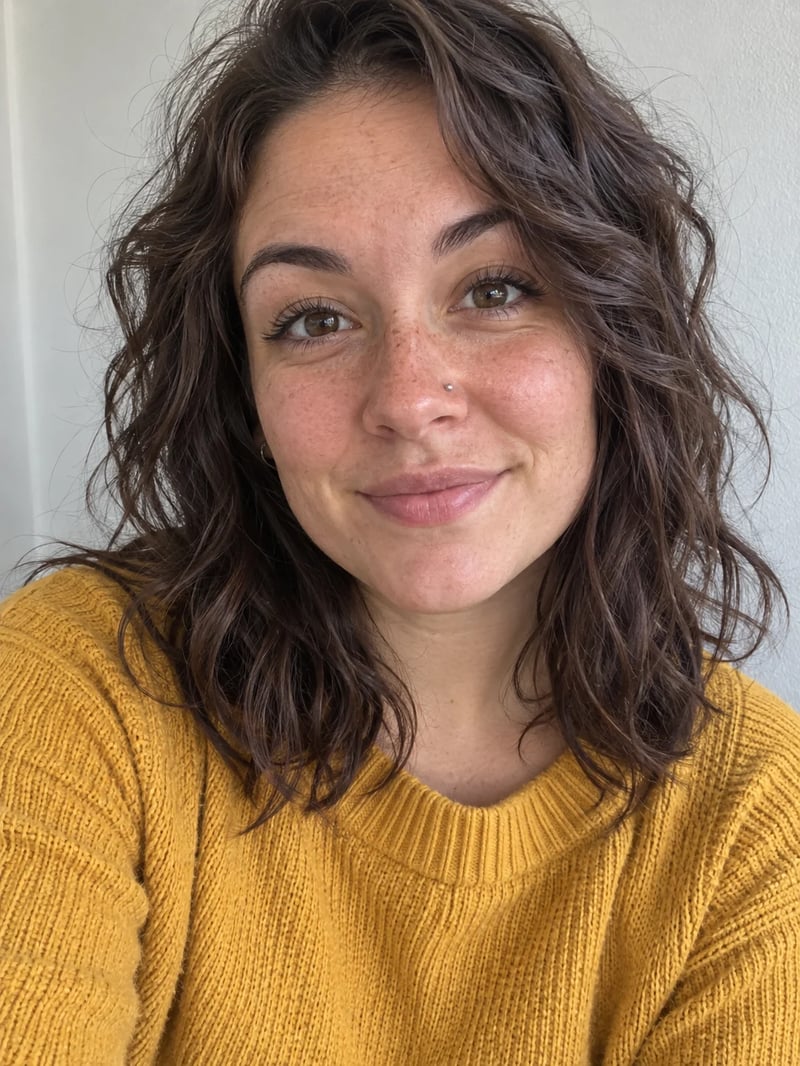
A model can only keep what it can see, so most faces that come back wrong started as a photo it could not read well. These two pictures are the input and one result from our test above.
A selfie like this one keeps you recognisable
This is the selfie that went into all twelve results above: straight on, eyes open, soft daylight from a window, a plain wall, and the freckles and nose stud in plain view. Avoid group photos, heavy beauty filters, strong shadows across half the face, and very old or blurry pictures: the model fills in what it cannot see, and that is where the face changes.
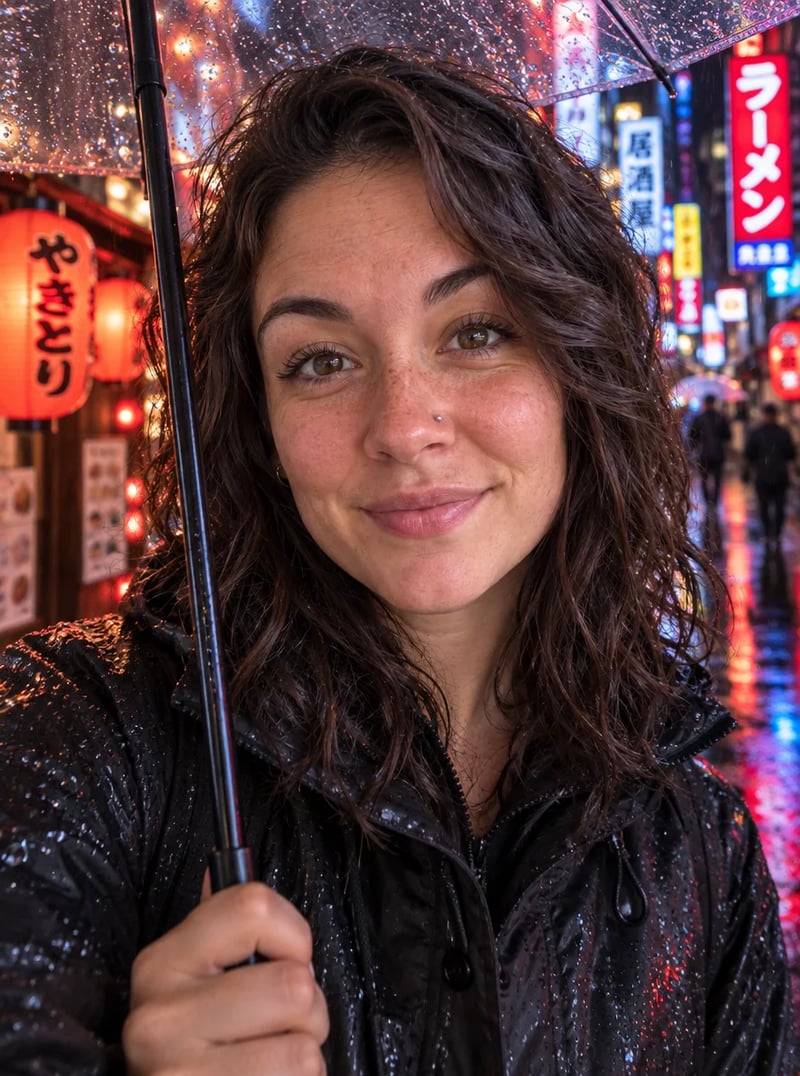
Close shots keep the face, wide shots lose detail
When a model pulls back to show a whole street or a park bench, your face becomes a small part of the picture and fine details go first. If likeness matters more than the scene, ask for "a waist-up shot" or "a close portrait", as in this Tokyo picture, then try a wider version once you have one you like.
Free credits, privacy and the rules for your photo
The short version of what happens to your selfie and what it costs. The full text is in our privacy policy.
- Free to try
- Yes, 10 credits on sign-up
- Three edits on GPT Image 2.5 Flare, Nano Banana 2.1 or Seedream 5.0 Flash, or five on FLUX 3 Klein.
- Photos you need
- One
- Unlike an AI selfie generator that trains on 10 to 20 photos first, this works from one.
- Watermark
- On free pictures
- Once you buy a plan or a credit pack, your pictures have no watermark.
- Used to train our models
- No
- Your photo goes only to the model that makes your picture and to our safety check, and we use it to show the picture in your history. We do not build face templates from it.
- Deleted after
- About 30 days
- Uploads and results are kept longer while you have a subscription; email us to delete them sooner.
- Who can be in the photo
- You, or people who agreed
- Nothing sexual or suggestive. Photos that look like a minor are blocked by the safety check.
What AI photos of yourself cost
AI pictures of yourself cost 2 to 3 credits each on the four models above. The monthly Basic plan adds 1,000 credits, enough to try dozens of scenes and keep the ones that look like you.
Up to 500 images
- Up to 500 images
- All models, including Premium
Up to 1,250 images
- Up to 1,250 images
- All models, including Premium
Up to 3,750 images
- Up to 3,750 images
- All models, including Premium
· No card required
Failed runs are refunded automatically · Cancel anytime
AI photos of yourself: questions
Yes. New accounts get 10 credits, which is three pictures on GPT Image 2.5 Flare or five on FLUX 3 Klein. Free pictures carry a watermark. After that, credits come from a monthly plan or a one-time pack, and the cost of each picture shows before you generate.
We do not use it to train our own models. Your selfie goes to the model that makes your picture and to our safety check, and we use it to show the picture in your history. Uploads and results are deleted about 30 days after you make them, or kept while you have a subscription. You can ask us to delete them sooner.
Yes, ChatGPT can edit a photo you upload, using OpenAI's image models. GPT Image 2.5 Flare here is also an OpenAI model. The difference is that here you can run the same selfie and prompt on four models side by side and keep the one that looks most like you.
Yes. Upload a photo of each person and ask the model to put you together, but only with adults who agreed to it. Faces drift more with every extra person, so check each face. For the best likeness, start with just yourself.
Requests for nude, sexual or suggestive pictures are refused, and photos that look like a minor are blocked by the safety check. Only upload photos of yourself or of people who agreed. Prompts meant to mislead people about someone, such as fake documents or fake endorsements, are against our rules too.
Usually the selfie was small, dark or partly covered, or the prompt asked for a wide scene. Try a closer, front-lit selfie, ask for a close portrait, and name the details to keep. If one model still drifts, run the same prompt on another: in our test GPT Image 2.5 Flare and Seedream 5.0 Flash kept the face best.
More ways to make pictures
Not sure which model to use for a picture without your face? See how eleven models did on our tests.